Integumentary / VISUAL EXPLAINER
How Can Living Cells Make a Nonliving Hair Shaft?
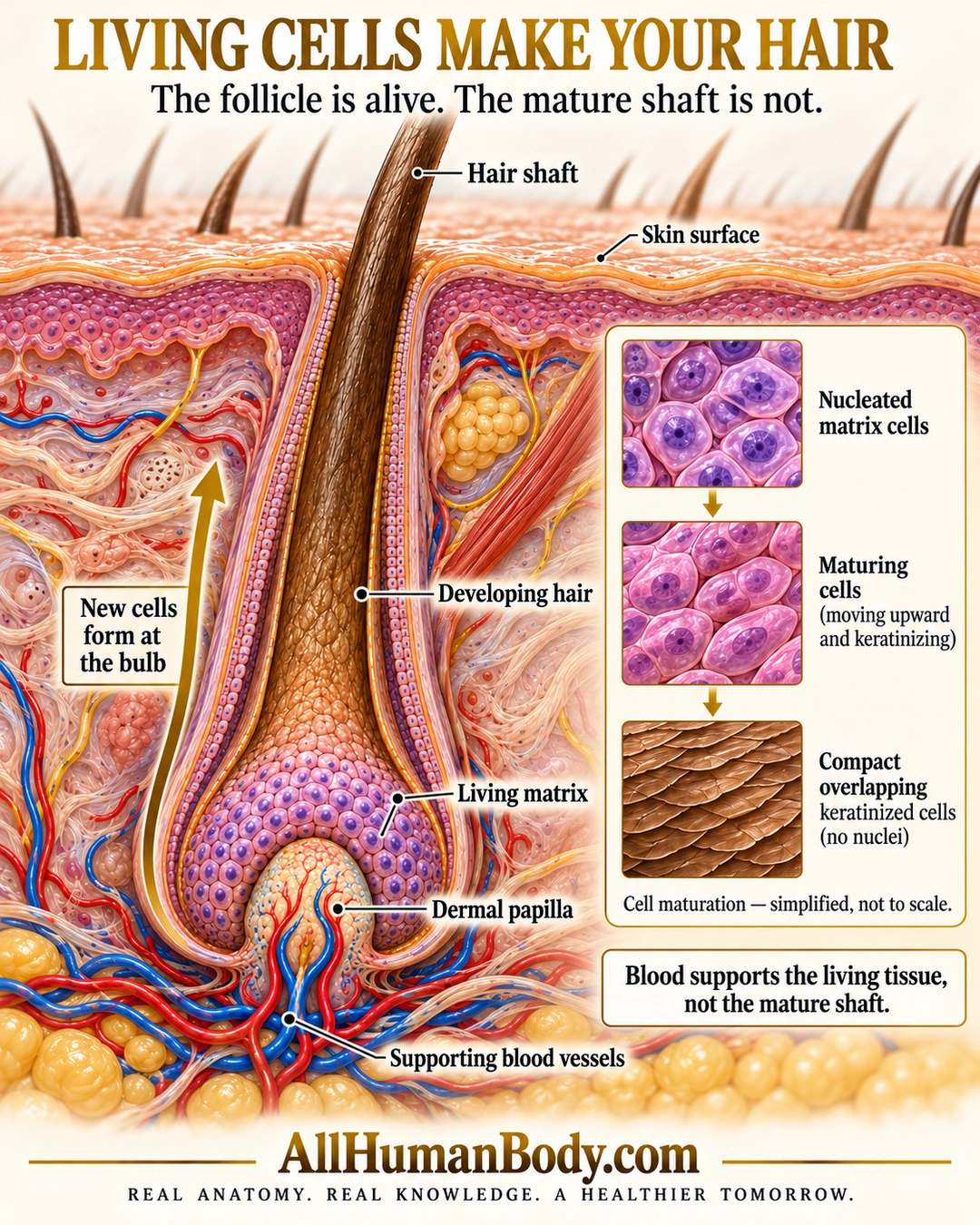
Living matrix cells in an active follicle produce developing hair. As cells mature and keratinize, they contribute to a nonliving shaft; supporting vessels supply living follicular tissue rather than running inside the mature shaft.
READ THE IMAGE
What the illustration shows
Ivory and gold poster titled Living cells make your hair. A large longitudinal follicle cutaway shows a brown hair shaft emerging above the skin. A bulb of purple nucleated living matrix cells surrounds the top and sides of the dermal papilla. Red and blue supporting vessels remain in the papilla and surrounding connective tissue, outside the shaft. Labels mark skin surface, developing hair, living matrix, dermal papilla and supporting vessels. An upward arrow indicates new cells form at the bulb. Three enlarged panels show nucleated matrix cells, maturing cells, and compact overlapping keratinized cells with no nuclei. Text says the follicle is alive, the mature shaft is not, and blood supports living tissue. Gold AllHumanBody.com and the full slogan sit below.
How to interpret this poster
- One growing follicle, not the complete growth/rest/shedding cycle or a fixed rate.
- Inset surface scales illustrate keratinization, not identical architecture of every shaft layer.
- No dead cells delivered through blood, hair-loss therapy or regeneration claim.
- AI-assisted educational illustration; not physician certification, microscopy, a diagnosis or individualized medical advice.
- Fine annotations need enlargement; the full description provides an accessible text alternative.
- Display the full uncropped illustration; do not trim titles, legends or boundary annotations.
AI-assisted educational illustration, adapted into web-sized images without changing its composition. This is general education, not an individual diagnosis or treatment recommendation.
EVIDENCE / CONTEXT
Sources and what they support
- University of Leeds Histology Guide: Hair ↗
Matrix production, papilla relationships and keratinized shaft.
- Southern Illinois University Histology: Hair follicles ↗
Hair-bulb production and follicular structural context.