Special Senses / VISUAL EXPLAINER
How Do Your Pupils Change Size?
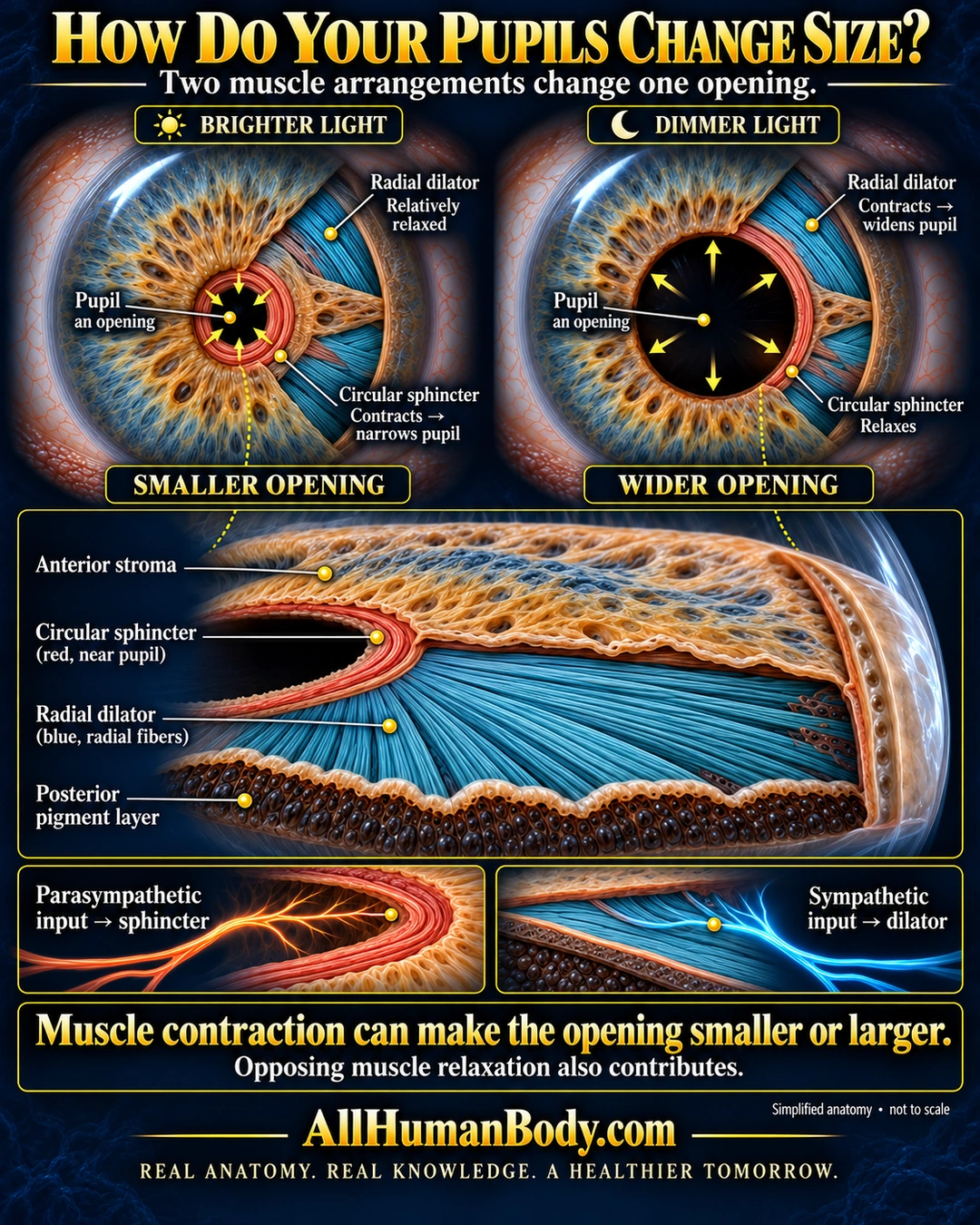
A ring-shaped iris muscle can narrow the pupil, while radially arranged muscle can widen it. Parasympathetic and sympathetic inputs primarily control these respective muscles, and relaxation of the opposing muscle also contributes.
READ THE IMAGE
What the illustration shows
Educational anatomy poster titled “How Do Your Pupils Change Size?” Two iris cutaways compare a smaller pupil in brighter light with a wider pupil in dimmer light. On the left, the circular sphincter contracts while the radial dilator is relatively relaxed; yellow arrows point inward. On the right, the radial dilator contracts while the circular sphincter relaxes; arrows point outward. Both pupils are labeled as openings. An enlarged cutaway shows anterior stroma above a red sphincter band near the pupil, blue radial dilator fibers, and a posterior pigment layer. Lower panels link parasympathetic input to the sphincter and sympathetic input to the dilator. The conclusion explains that muscle contraction can make the opening smaller or larger and that opposing muscle relaxation also contributes. Navy background, gold headings, and AllHumanBody.com branding. The artwork is labeled simplified anatomy, not to scale.
How to interpret this poster
- The pupil is an opening, not a solid structure; visible iris texture is not an exposed muscle map.
- The dilator is drawn thicker and more separated than its thin living arrangement.
- Bright/dim examples are simplified states, not a complete model of adaptation or a diagnostic test.
- AI-assisted educational illustration; not physician certification, microscopy, a diagnosis or individualized medical advice.
- Fine annotations need enlargement; the full description provides an accessible text alternative.
AI-assisted educational illustration, adapted into web-sized images without changing its composition. This is general education, not an individual diagnosis or treatment recommendation.
EVIDENCE / CONTEXT
Sources and what they support
- About the Eye ↗
The pupil is an aperture and the iris regulates light entry.
- Ocular Motor System ↗
Circular/radial muscle actions, their autonomic supply and opposing relaxation.